Below are examples of how content uploaded in the HILO Admin Portal appears on the app. Please note character count limits when preparing content.
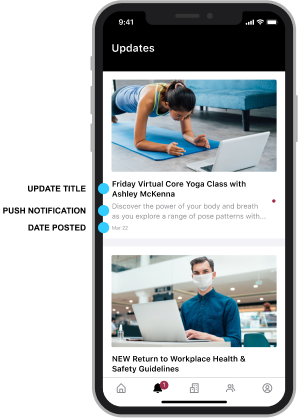
UPDATES
Update Feed
Update Feed
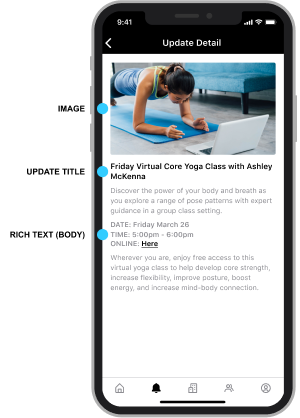
Update Detail
Update Detail
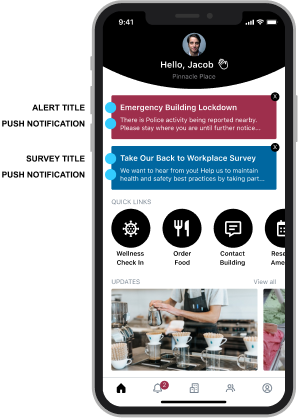
Dashboard
Dashboard
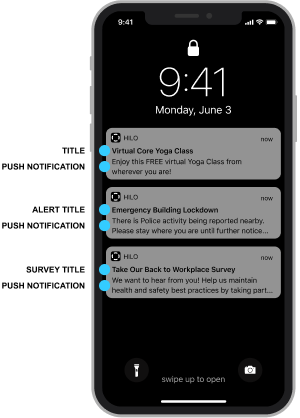
PUSH Notification
Notifications
TITLE: maximum 50 characters including spaces, please use title case and avoid using all uppercase text. Appears in: Updates Feed, Updates Detail, Dashboard, PUSH Notifications
PUSH NOTIFICATION: maximum 155 characters, recommended 110 characters or less, including spaces. Appears in: Updates Feed, Dashboard Alerts & Surveys, PUSH Notifications, Updates Feed.
BODY COPY: no character limit, this text can be formatted with basic tools (bold, italic, underline, hyperlinks, emojis etc.). Appears in: Update Detail
DATE POSTED: date posted automatically applied. Appears in: Update Feed
IMAGE: Update images are 16:9 ratio (recommended size is 1024px x 576px). NOTE: Any images that are not 16:9 ratio will display incorrectly on the app. Images are recommended but not required. If you do not upload an image, a default generic Update image will automatically display on the app. Try to avoid having any small, hard to read text on an Update image. If you must add text, leave at least 30px clear on all sides so text does not get cut off on different size devices. Appears in: Updates Feed, Updates Detail, Dashboard: only Update type Notification, PUSH Notifications: some devices may display image.
REWARD OFFERS
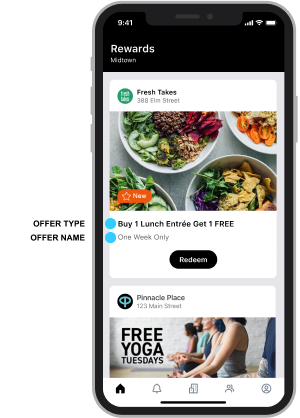
Rewards Feed
Rewards Feed
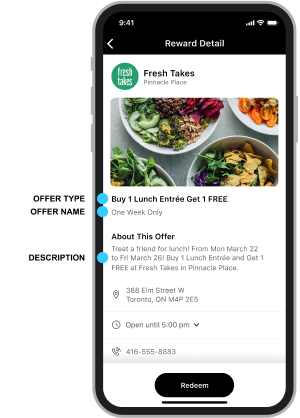
Reward Detail
Rewards Detail
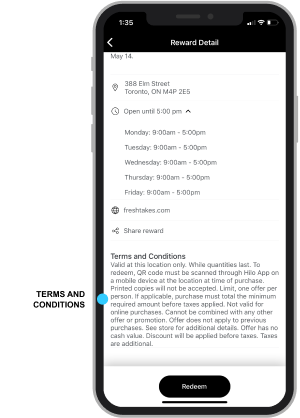
Reward Detail
Rewards Detail
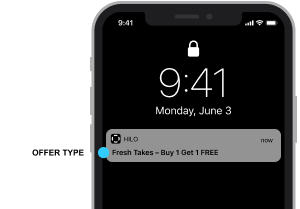
PUSH Notifications
Notifications
Image Cropping
OFFER TYPE: select from these offer types: $ Off, % Off, Buy One Get One, Event:Paid or Event:Free. Appears in: Rewards Feed, Reward Detail, Dashboard, PUSH Notifications
OFFER NAME: the text area is labelled ‘What is your offer called?‘ on HILO’s Admin Portal. Maximum 75 characters including spaces. Appears in: Rewards Feed, Reward Detail
DESCRIPTION: on Hilo Admin Portal, the field is labelled ‘Describe your offer highlights’. Maximum 250 characters including spaces. If more than 250 characters are input, you will not be able to submit the offer. Appears in: Rewards Feed under heading ‘About this Offer.’
TERMS AND CONDITIONS: no character limit. Appears in: Rewards Detail
PUSH NOTIFICATION: content is automatically generated and displays the business or building name and the Offer Type. Appears in: PUSH Notifications
IMAGE: Reward images are 16:9 ratio (recommended size is 1024px x 576px). NOTE: Each Reward must have an image. Any images that are not 16:9 ratio will display incorrectly on the app. Try to avoid having any small, hard to read text on a Reward image. If you must add text, leave at least 60px clear on all sides so text does not get cut off on different size devices. An orange NEW badge will temporarily appear in the bottom left corner inside the ‘critical content safety area’, keep critical content clear of the bottom left. Appears in: Rewards Feed, Reward Detail, Dashboard
If you have any questions or concerns, please contact your Client Success Manager or email hello@hiloapp.com.
Request Demo
Submit this form and a HILO team member will contact you to schedule a demo.